
Cover image source: AI-generated editorial illustration. The chair, studio and material samples are conceptual and do not identify a tested product.
How to compare office chair prices
An office chair price comparison should begin with the ordered configuration and the complete purchasing scope. Use retail prices to understand a selling position, and use an itemized manufacturer quotation to budget a supply program. A shared model name or an ergonomic label does not make two offers equivalent.
- Compare the same mechanism, arms, upholstery and packing state.
- Separate recurring unit costs from development and validation.
- Allocate freight and receiving using the actual order and route.
- Evaluate parts, service and fit alongside the purchase price.
| Price basis | What it includes or measures | What to confirm |
|---|---|---|
| US retail reference | Public consumer selling offer | Options, promotion, tax and delivery |
| Manufacturer unit quotation | Specified chair and agreed supply scope | BOM, quantity, exclusions and delivery basis |
| Allocated development | Defined fixed program cost divided by units | Scope, approved changes and actual volume |
| Landed and operating cost | Delivery, receiving, assembly and service | Destination-specific inputs and field assumptions |
Office chair prices through a defined retail sample
Office chair price comparison is useful when it identifies what a buyer receives at each price. A public retail price reflects a complete selling offer, which can include distribution, customer service, local inventory and brand positioning.
An OEM quotation concerns a specific manufacturing and supply scope. Neither figure can be converted reliably into the other by applying a universal markup.
This article combines a small dated retail reference set with technical selection and an original procurement cost model.
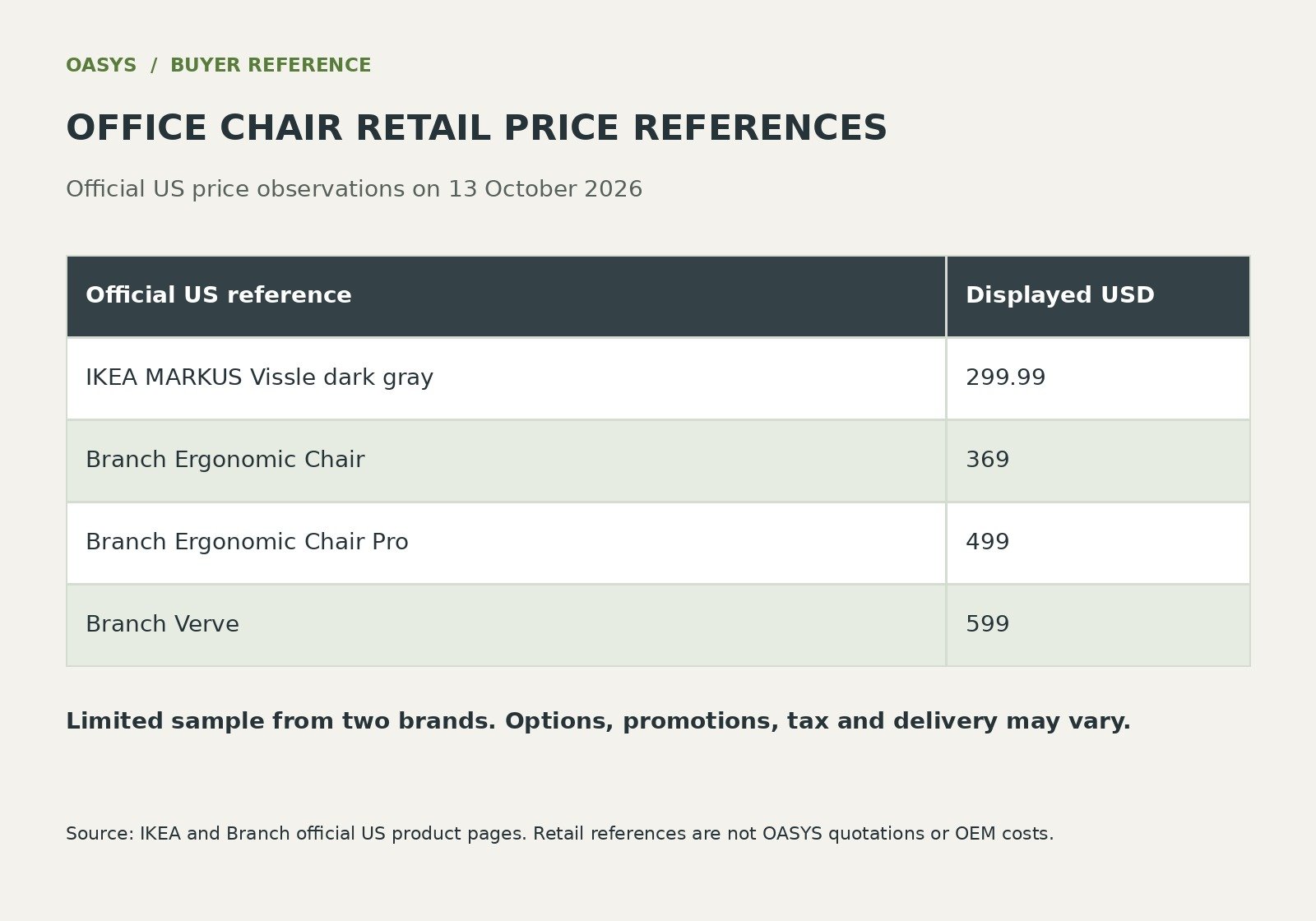
On 13 October 2026, the official US IKEA page for MARKUS in Vissle dark gray displayed USD 299.99. Branch displayed USD 369 for its Ergonomic Chair, USD 499 for Ergonomic Chair Pro and USD 599 for Verve in its official chair comparison.
These four displayed prices from two brands are reference points, not a representative market survey or a market average. Options, availability, promotions, delivery, tax and the final cart total require a fresh check before a transaction.
The references are official retailer pages; none is an OASYS factory quotation.
A buyer should compare the configuration attached to each price. Record seat depth adjustment, arm movements, mechanism controls, available sizes, upholstery, assembly, return conditions and service.
If one price starts from a standard version and another includes additional options, bring those differences into the record. Do not rank ergonomic suitability by price or by counting controls.
The technical sections below explain how to determine whether the offered functions serve the actual application.
Use the sample to identify questions for assortment planning. A furniture brand considering a similar retail position needs its own channel model, target customer, order volumes and support costs.
The retail sample does not reveal a competitor’s manufacturing cost or margin. A technically simple chair can have a high retail price for several reasons, and a more adjustable chair can fail to fit a particular user.
Procurement should preserve this distinction when discussing an intended market price with a manufacturer.
| Official US retail reference | Displayed USD | Observed date |
|---|---|---|
| IKEA MARKUS Vissle dark gray | 299.99 | 13 October 2026 |
| Branch Ergonomic Chair | 369 | 13 October 2026 |
| Branch Ergonomic Chair Pro | 499 | 13 October 2026 |
| Branch Verve | 599 | 13 October 2026 |
Build an OEM cost model from visible inputs
Consider a hypothetical order of 500 chairs. Assume the agreed manufacturing scope is USD 85 per chair, development and validation together are USD 4,000, transport and destination handling allocated to the lot are USD 3,500, and receiving plus assembly is USD 6 per chair.
Before tax and duty, the modeled unit total is 85 + 4,000/500 + 3,500/500 + 6 = USD 106. This is a worked budgeting example.
It does not estimate OASYS costs, current freight rates, laboratory pricing or the import treatment of any market.
At 1,000 chairs, the same fixed development allocation would be USD 4 per chair rather than USD 8. That calculation does not authorize halving the freight allocation.
Freight may change with carton dimensions, container count, delivery route and timing; the larger order also requires additional cash and inventory space. Recalculate each input according to its actual behavior.
A quantity discount is valuable only if the remaining assumptions and operational obligations are understood.
Technical cost drivers should be described through the required outcome. A seat slider changes usable depth and introduces interfaces.
A different arm assembly changes movements, adjustment range and replacement needs. A molded seat program may introduce tooling while improving the repeatability of a defined contour.
The buying decision should connect each proposed expenditure to a fit requirement, an assembly condition or a documented service obligation. A generic description such as premium mechanism does not explain the cost difference.
Normalize supplier proposals before discussing savings. A USD 78 chair excluding USD 8 arms and USD 4 required packaging becomes USD 90 at comparable scope.
Against an USD 85 complete offer, it adds USD 2,500 to a 500-chair order before any other differences. Keep testing, spare parts and changes visible as separate lines.
If a supplier’s alternative material is technically acceptable, it can be evaluated as an alternative configuration rather than silently substituted into the comparison.
Keep market positioning and purchasing approval connected through a contribution model maintained by the buyer. Include channel fees, distribution, returns and service in the selling model, using the organization’s own records where available.
A lower factory price does not establish a higher commercial return if the product creates more assembly work or requires a different support system. The correct decision is the configuration whose required performance and business obligations can be supplied at the approved total cost.
| Hypothetical cost input | Lot or unit assumption | USD per chair at 500 units |
|---|---|---|
| Specified manufacturing scope | USD 85 per chair | 85 |
| Development and validation | USD 4,000 for the lot | 8 |
| Transport and destination handling | USD 3,500 for the lot | 7 |
| Receiving and assembly | USD 6 per chair | 6 |
| Modeled total before tax and duty | 85 + 8 + 7 + 6 | 106 |
Compare the functions behind the price
- Identify the functions included in the base price.
- Quote mechanism, arms and upholstery options separately.
- Check packing, assembly and local support scope.
Task chair usually indicates a chair intended for active work rather than waiting, dining, or occasional visiting. Ergonomic chair usually emphasizes features presented as supporting the user. Manufacturers and retailers may apply these labels differently. A buyer should therefore ask what the supplier means and examine the actual specification before using either category to shortlist products.
In a purchasing document, avoid making the label the entire requirement. A request for an ergonomic task chair should be followed by the application, dimensions, required movements, evidence, and approval method. This gives the manufacturer a practical description of the needed product and helps the buyer explain why a proposed chair is suitable.
Start with the work being performed
Describe the tasks before choosing features. Computer work, document review, collaborative discussion, reception duties, and frequent movement between stations place different demands on the seating arrangement. Record the working surface, equipment, and access requirements. Ask how often users change tasks and whether the chair must support several stations or remain at one desk.
Separate the principal task from occasional activities. A chair selected mainly for keyboard work may also be used for brief meetings, but that does not mean the two uses deserve equal weight in the specification. Identify the situations that drive purchasing and the situations that need acceptable secondary performance. This prevents an assortment from becoming unnecessarily complex.
Observe actual work where possible. A written job description may omit how people reach equipment, move documents, or share a desk. Use these observations to prepare trial tasks and workstation requirements. They are project information rather than evidence that a particular chair will improve productivity or reduce injury.
Check workstation fit before buying more features
Chair fit depends on the person and the workstation. CCOHS explains that an ergonomic chair must suit the user, work, and surrounding station (Canadian Centre for Occupational Health and Safety, 2021). For procurement, that means a product should be evaluated in the environment where it will be used, with users who reasonably represent the intended population.
Ask whether feet can be supported at a working height, whether usable seat depth is appropriate, and whether the back support can be reached without compromising the task. Review arm position and desk access. The goal is to identify mismatches that a catalog description may not show. A chair’s adjustment range is relevant only when users can reach a workable setup within it.
Plan an accommodation route for people outside the general selection. A standard chair can simplify purchasing, but the organization should know how exceptions will be identified and supplied. The alternative might be another configuration, different workstation equipment, or an individual assessment. Document the process so users are not left to improvise unsupported modifications.
Compare seat geometry before adding accessories
The seat establishes the user’s basic relationship with the chair. Compare usable width and depth, contour, front edge, and the effect of adjustment. Ask the supplier how dimensions are measured and whether upholstery or cushion compression affects the stated geometry. A nominal measurement should not be assumed to describe every aspect of the occupied seat.
Evaluate the seat in the intended task position. A user who moves forward to reach the desk may no longer use the back support as expected. Ask why that movement occurs. The issue may concern desk height, equipment placement, arm interference, or seat geometry. Adding a headrest does not resolve an unidentified mismatch elsewhere in the system.
Use structured observations in trials. Record the setup, the adjustment used, and the specific concern. Distinguish an initial preference for softness from an ability to maintain a workable position. Procurement teams should avoid declaring one cushion universally comfortable based on a small group of first impressions.
Evaluate back support through its actual range
Backrest evaluation should consider shape, height, movement, and the user’s relationship with it during the task. Ask what adjustment is available and what each control changes. A movable lumbar element, a flexible back, and a height adjustable backrest may address different aspects of setup. Their names are insufficient to establish equivalent functionality.
Assess whether users understand the controls and can find a suitable position without excessive effort. Record whether an adjustment stays where intended during normal use. Avoid assigning a universal ideal location or pressure through a general buying guide. Individual geometry and workstation conditions should be evaluated by appropriate personnel when specific needs arise.
Compare configurations under consistent conditions. An optional headrest can change the occupied envelope and the way a user experiences recline. A different back upholstery may change feel or appearance. Confirm that the version evaluated matches the version quoted. Otherwise, a favorable trial may support a configuration that the buyer does not actually order.
Compare mechanism arms and control costs
Movement features deserve their own review. Identify which parts move, how resistance is controlled, and what locking or limiting functions are available. Ask whether the user must adjust resistance manually or whether the mechanism adapts in a stated way. Test the supplier’s explanation against the operating instructions rather than relying on a marketing label.
During a trial, examine controlled entry into recline, the return toward the working position, and the relationship with the desk. Record any need for assistance or repeated adjustment. The purpose is to understand usability and task compatibility. A short trial cannot establish mechanical durability or replace relevant product testing.
Decide how much movement the application requires. Shared seating may prioritize straightforward controls, while an individually assigned chair may support a more detailed setup. Neither preference establishes a universal superior mechanism. Compare the proposed behavior with the users’ tasks and the organization’s willingness to provide instruction and support.
Assess armrests through desk compatibility
Armrests can support particular work positions, but their usefulness depends on the task and workstation. OSHA’s workstation guidance addresses arm support and interference with desk access (Occupational Safety and Health Administration, n.d.). Procurement teams should therefore evaluate both the available support position and the ability to approach the working surface.
Measure the relevant armrest range and desk clearance. Ask whether adjustment changes height, width, depth, or pad angle. Check the actual configuration rather than assuming a 3D or 4D description has the same meaning across suppliers. Record positions that work and positions that create interference. This information is more useful than counting adjustment axes alone.
Consider whether an armless option is appropriate for a particular application, subject to the user’s needs. A narrow workstation or a frequent movement task may create a different requirement from a broad desk with extensive computer use. The choice should be documented through the application review and user trial, with exceptions managed deliberately.
Evaluate controls as part of the product
Adjustability provides limited value when users cannot find or understand the controls. Review lever placement, symbols, tactile distinction, operating effort, and instructions. Ask a first time evaluator to perform the setup sequence without coaching, then compare that experience with the intended instruction. The observation helps identify what training or labeling the organization must provide.
Record errors and recovery. A user may operate the wrong lever or misunderstand a lock state. Determine whether the mistake is easy to correct and whether the instruction explains the action clearly. Do not treat unfamiliarity as a defect automatically; identify whether the issue can be resolved through a practical setup guide or requires a different product.
Include accessibility considerations in the review. Some users may have difficulty reaching a control or applying the required force. The purchasing team should know how individual requirements will be assessed and addressed. A general usability trial is helpful, but it should not be presented as proof that all users can operate every function.
Evaluate evidence service and setup
- Match product reports to the quoted configuration.
- Price spare parts and the approved replacement unit.
- Include receiving, assembly and setup work in the cost model.
A chair category does not establish structural performance. Request relevant product reports and confirm the sample identity, standard edition, issuing laboratory, and relationship with the proposed configuration. Ask how optional arms, bases, mechanisms, or upholstery affect applicability. The review should be performed by someone able to assess the evidence and any proposed equivalence.
Keep the supplier’s claim precise. A statement that a chair is tested is incomplete without identifying what was tested and what result supports the claim. A management system certificate answers a different question from a chair performance report. A material test also has a defined scope. The purchasing file should distinguish these documents rather than combine them under a general certification heading.
If the supplier cannot immediately provide the required evidence, record the issue and the condition for closing it. Do not let an attractive trial chair or a favorable price make the missing requirement disappear. The final decision should identify which mandatory conditions have been satisfied and which remain unresolved before order approval.
Compare the service implications
Feature selection changes the service profile. More adjustable assemblies may create more part types and instruction needs. A simpler configuration may be easier to explain but provide less accommodation. Ask for parts identification, replacement guidance, warranty procedures, and compatibility records. Evaluate how the organization will respond when a chair needs attention.
Check whether the service team can identify the chair version. Similar looking models may use different mechanisms or arm assemblies. Request an order configuration record and a method for connecting an installed unit to that record. This improves the accuracy of parts requests and helps avoid unreviewed substitutions during maintenance.
Discuss discontinuation and future availability before committing to a standard. The buyer should understand what notice or alternatives the manufacturer proposes if a component changes. A longer feature list is commercially useful only when the program can support the product after installation. Service planning belongs in the selection decision rather than being deferred until the first claim.
Trial the product against the buying application
Prepare a trial protocol with consistent tasks and a clear feedback form. Include setup, desk access, control operation, movement, and perceived fit. Recruit a reasonable range of intended users and identify any population the trial does not represent. The protocol is an original procurement recommendation and should be adapted by the organization’s ergonomics or occupational health personnel.
Use the actual desk and equipment where practical. If the trial uses a different workstation, record the limitation and review compatibility separately. A chair may receive favorable feedback in a showroom and behave differently under a shallow desk or a fixed keyboard surface. Environmental context should remain visible in the evaluation record.
Keep the trial separate from final approval. Review observations alongside technical requirements, evidence, cost, and service. Resolve conflicts through documented decisions. A popular chair with an unresolved mandatory requirement should not be approved simply because its preference score is high. The trial informs selection; it does not replace the rest of the purchasing process.
Use three hypothetical purchasing scenarios
Consider a hypothetical individually assigned office workstation. The buyer may prioritize a broad usable adjustment range, clear setup instructions, and service parts because the chair will remain with one person. A detailed mechanism can be suitable if the user receives enough guidance and the workstation permits the intended positions. The category name alone does not settle the choice.
Now consider a shared project room. Frequent changes of user may make simple controls and quick adjustment especially valuable. The buyer should test how new users set up the chair and whether required settings can be reached without assistance. The preferred configuration might differ from the individually assigned workstation even within the same supplier range.
Finally, consider a compact home office assortment sold through a distributor. Packaging, assembly clarity, desk compatibility, and remote support may carry substantial weight. The buyer should evaluate how a customer selects the correct version and learns its controls. These scenarios demonstrate that one model can be a good choice for one purchasing system and a poor choice for another.
Preserve the approved purchasing standard
Selection does not finish when chairs arrive. Provide a setup sequence tied to the supplied configuration and the workstation. Identify who checks assembly and who helps users understand controls. Instructions should be accessible to people joining the organization later, not only to the first group present at installation.
Use a short demonstration followed by individual setup where appropriate. Ask users to locate the main controls and explain how to request help. Record common questions and update the guidance. This is an operational recommendation; it does not establish that training alone will resolve every fit concern or individual requirement.
Review the workstation if a user cannot find a workable position. Desk height, keyboard location, foot support, and equipment arrangement may need attention alongside the chair. Assign a route for unresolved issues. The organization should be able to distinguish a setup question, a product fault, and a need for individual assessment without making the user manage the problem alone.
Maintain a controlled chair standard
For a corporate program, maintain an approved configuration rather than only an approved model name. Record components, upholstery, evidence, instructions, and service contacts. Purchasing teams should use that record for reorders and confirm any proposed change before it enters supply. This keeps the delivered chair aligned with the one evaluated.
Review feedback after installation. Identify recurring control questions, service conditions, and accommodation requests. Use the information to refine instruction or reconsider the specification where warranted. Avoid interpreting a small number of complaints as proof that an entire category fails, or a small number of favorable comments as proof that it works universally.
Keep an exception pathway active. A standard can simplify procurement while allowing other configurations where justified. Record the reason for each approved exception and the evidence supporting it. Over time, those records can reveal whether the standard needs adjustment or whether the organization serves several distinct seating applications.
Discuss your office chair project with OASYS
Share your target market, application, proposed configuration, quantity and launch requirements with OASYS. A useful inquiry identifies which requirements are approved and which need engineering or commercial input.
Explore OEM and ODM services · Explore furniture resources · Contact OASYS
Continue the purchasing review
Use the office chair RFQ checklist to normalize scope, and the chair mechanism comparison to describe the functions behind an option premium.
References
Canadian Centre for Occupational Health and Safety (2021, January 7). Office ergonomics: ergonomic chair. https://www.ccohs.ca/oshanswers/ergonomics/office/chair.html
Occupational Safety and Health Administration (n.d.). Computer workstations: Chairs. https://www.osha.gov/etools/computer-workstations/components/chairs
IKEA. MARKUS office chair official US product page. Price observed 13 October 2026. https://www.ikea.com/us/en/p/markus-office-chair-vissle-dark-gray-90289172/
Branch. Ergonomic Chair Pro official US product page and chair comparison. Prices observed 13 October 2026. https://www.branchfurniture.com/products/ergonomic-chair-pro